
Adding, editing and deleting action priorities
Action priorities are used to prioritize and organize actions in Certainty. You can add, edit and delete them in 'Manage Actions - Action Priorities'.
Action priorities are indications of the urgency or severity of actions and findings required by auditors such as ‘High’, ‘Medium’ or ‘Low’. They are part of the ‘Add/Edit Action’ form in the Mobile App and Admin Portal.
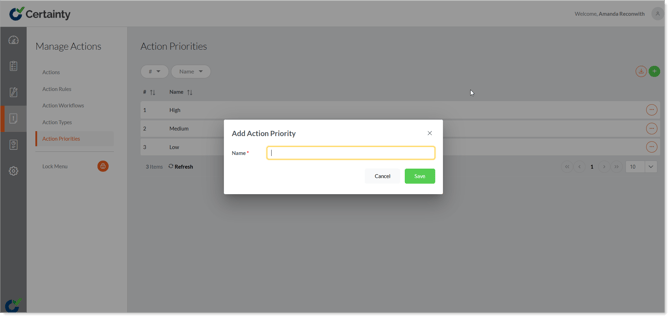
To add an action priority:
- Go to ‘Manage Actions – Action Priorities’ to open the action priorities table.
- Click on the green ‘Add’ button to open the ‘Add Action Priority’ form.
- Give the the action priority a name.
- Click ‘Save’.
To edit an action priority:
- Go to ‘Manage Actions – Action Priorities’ to open the action priorities table.
- Find the row of the action priority you want to edit and click on the ‘Options’ menu on the right side of the row.
- Select ‘Edit’ top open the ‘Edit Action Priority’ form.
- Change the name.
- Click ‘Save’.
To delete an action priority:
- Go to ‘Manage Actions – Action Priorities’ to open the action priorities table.
- Find the row of the action priority you want to delete and click on the ‘Options’ menu on the right side of the row.
- Select ‘Delete’.
- Confirm that you want to delete the record.
Notes
-
If actions are associated with an action priority you are not able to delete it.