
Enabling 'AI Insights' for a checklist
AI Insights can be enabled for checklists in 'Manage Checklists - Checklists & Checklist Groups - Checklists' to help analyze audit and inspection results in the Admin Portal.
- Go to 'Manage Checklists - Checklists & Checklist Groups - Checklists' and click on the row of the checklist you would like to enable AI Insights for.
- In 'Options', select 'Edit' to open the 'Edit checklist' form.
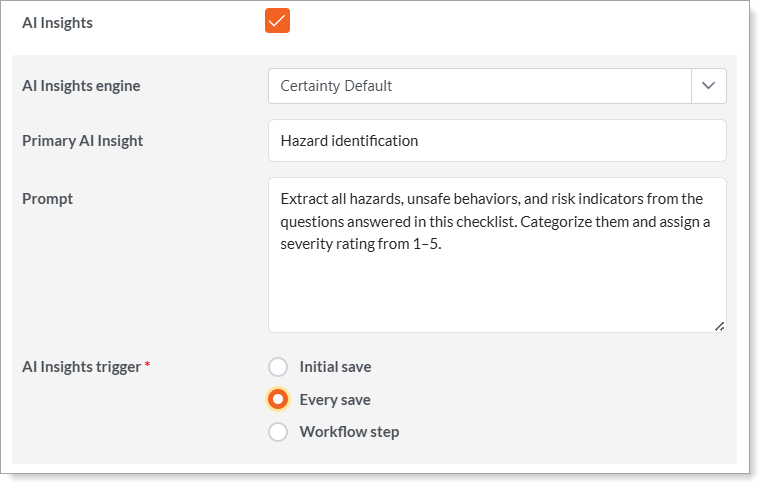
- In the 'AI settings' section, check the 'AI Insights' box.
- Make sure to select an engine and enter a primary insight and a prompt.
- Set the trigger for the AI Insights analysis.
- Once enabled for the checklist, you can enable AI Insights at page, question set and question level.
- Save and publish your checklist. Now, AI Insights is enabled and ready to use.
Notes
- The 'Primary AI Insight' is used to categorize the insights. This is the first AI insight generated and can be seen in 'Completed Checklists'.
- An example of a primary insight is 'Hazard identification' or 'Missing PPE".
- AI Insights identifies that an inspection question about proper use of PPE while working at height was answered to indicate an improper tie-off point or that the anchor lanyard was slack while the worker was at height.
- Depending on the primary insight and the prompt a "Hazard identified' or "Missing PPE" alert can be generated for these specific tie-off violations, categorized and assigned a severity rating as instructed by the prompt.
- A prompt is instructions that you would like AI Insights to keep in mind while providing its analysis. The prompt should be concise and can be entered at checklist, page, question set and question level.