
Adding and editing action comments
You can add comments to your actions and edit them in ‘Manage Actions – Actions’. Comments are available to view in ‘Actions’ and visible to Mobile App users with access to the Action.
To add a comment to an action:
- Go to ‘Manage Actions – Actions’.
- Find the action you want to edit.
- Click anywhere in the row of the action to open the details page.
- In the table below select the ‘Comments’ tab.
- Click the green ‘Add’ button on the top right side of the ‘Comments’ table to open the ‘Add Comment’ pop-up.
- Enter your comment.
- Click ‘Save’.
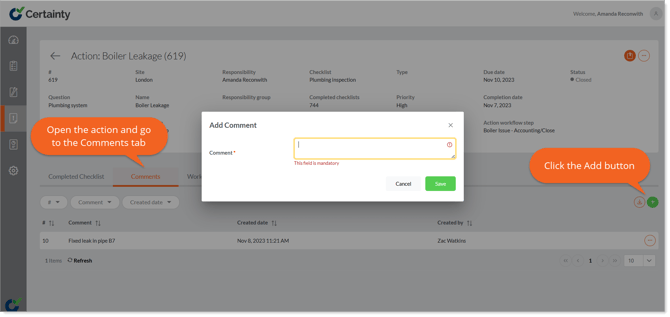
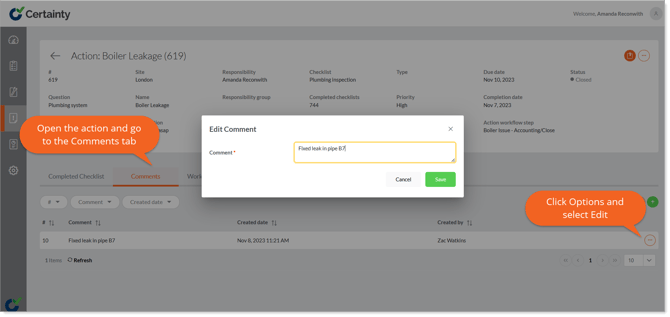
To edit an action comment:
- Go to ‘Manage Actions – Actions’.
- Find the action you want to edit.
- Click anywhere in the row of the action to open the details page.
- In the table below select the ‘Comments’ tab.
- Click the ‘Options’ button on the right side of the comment you ant to edit to open the ‘Edit Comment’ pop-up.
- Edit the comment.
- Click ‘Save’.
Learn this next...
How do I delete Actions and Action Comments in the Admin Portal?