
Adding Actions in Certainty
Actions can be created:
- In the Mobile App during an audit or inspection when a user finds the answer to a question requires corrective action to be taken.
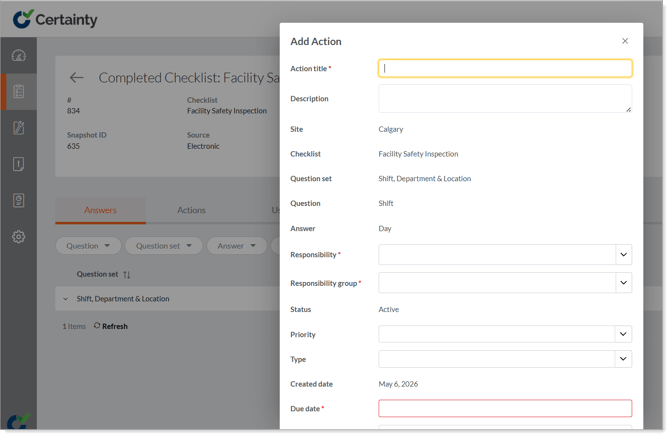
- In the Admin Portal, in ‘Manage Completed Checklists - Completed Checklists’, in the ‘Answers’ tab of the completed checklist, when a user reviews the audit and inspection reports and decides action is required.
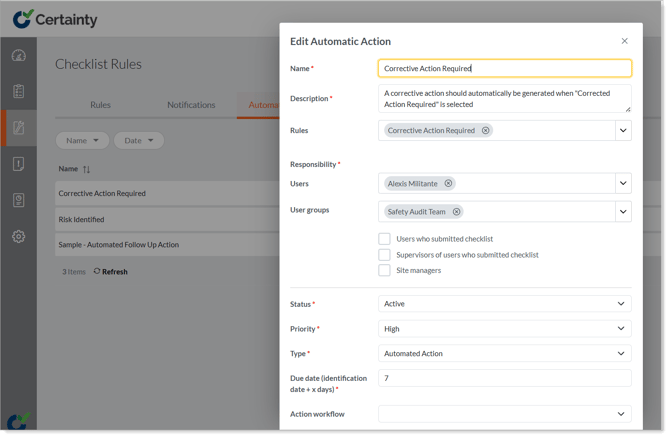
- Automatically by the system when a question is answered in a certain way. Automatic Actions are triggered by a rule and configured by an administrator in ‘Manage Checklists - Checklist Rules - Automatic Actions’.
Adding an Action in 'Completed Checklists - Answers':
Configuring an Automatic Action in 'Checklist Rules - Automatic Actions':
Notes
- For Mobile App users to be able to add actions ‘on-the-fly’ as they are completing a checklist you need to enable the checklist to ‘Allow Actions’. Actions can be enabled for a question, question set or an entire checklist in ‘Manage Checklists – Checklists’.
Learn this next...
How do I allow Mobile App users to add Actions during audits and inspections?