
Adding images and files to a completed checklist:
To add images and files to answers in a completed checklist after it has been submitted to Certainty:
- Go to 'Manage Completed Checklists' and select the 'Completed Checklists' tab. The completed checklist table will open.
- Click the row of the completed checklist you would like to add images to. The details page for that record will open.
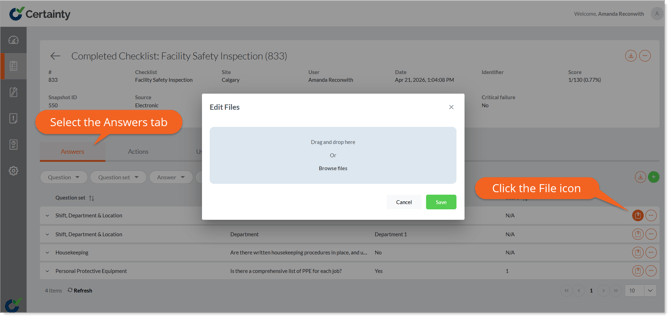
- Go to the lower table and click the ‘Answers’ tab.
- Click the ‘Files’ icon to the right of the answer you want to add an image or file to to open the ‘Add files’ pop up.
- Drag and drop or browse to the file you would like to add.
- Click ‘Save’.
Learn this next...
How do I add Actions to a Completed Checklist in the Admin Portal?