AI Vision - Overview
Vision is best for:
- Inspections with photo or video evidence.
- Document-heavy audits where reviewers spend time re-reading attachments.
- Programs where you need higher confidence in what is being submitted and what is not.
AI Vision enables:
-
Reduced manual rework - Spend less time transcribing evidence into fields.
-
Better data integrity - Enforce confidence thresholds and review rules before data is accepted.
-
More defensible evidence - Connect answers directly to the supporting attachment for context.
How does AI Vision work?
Administrators can enable artificial intelligence analysis of photos and files attached to audit and inspection checklists. AI Vision can then help field users answer checklist questions based on images and files they upload in the Mobile App.
Admin Portal:
-
Checklists: Administrators can enable 'AI Vision' for checklists and set up specific AI instructions (prompts).
-
Questions: Administrators can configure individual questions to be answered by the AI and define tailored AI prompts for each question.
Mobile App:
-
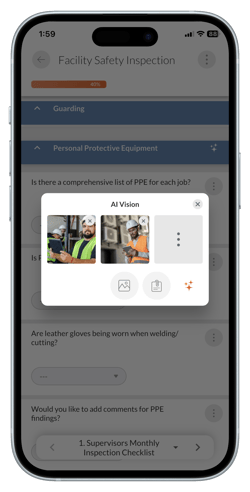
Image Upload & Processing: While completing a checklist, a field user can tap the AI Vision sparkle icon to upload or take photos of the audit or inspection site.
-
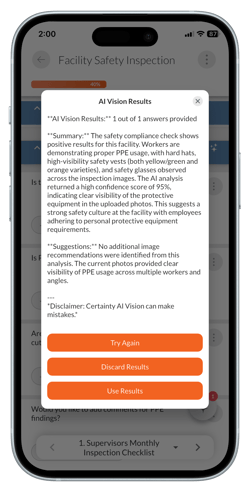
AI Analysis: AI Vision can process the images against the predefined prompts and generates a results summary for the user to review.
-
Auto-Populated Checklists: AI Vision answers can then be used to populate fields based on visual findings, significantly speeding up the inspection process.