---
title: Checklist Library – Overview
description: The 'Checklist Library' is a collection of template checklists provided by Certainty that can be imported and edited to suit your project.
---
[Skip to content](https://help.certaintysoftware.com/en/certaintyknowledgebase/checklist-library-overview#main-content)
English
Show submenu for translations
[](https://www.certaintysoftware.com/)
Open main navigation
Close main navigation
- English
Show submenu for translations
- [Contact Support](https://help.certaintysoftware.com/en/certaintyknowledgebase/contact-certainty-technical-support-)
[Contact Support](https://help.certaintysoftware.com/en/certaintyknowledgebase/contact-certainty-technical-support-?hsLang=en)
How can we help?
- There are no suggestions because the search field is empty.
1. [Help Center](https://help.certaintysoftware.com/en/certaintyknowledgebase?hsLang=en)
2. [Administrators](https://help.certaintysoftware.com/en/certaintyknowledgebase/administrators?hsLang=en)
3. [Managing Checklists - Admin Portal](https://help.certaintysoftware.com/en/certaintyknowledgebase/administrators?hsLang=en#managing-checklists-admin-portal)
# Checklist Library – Overview
## The 'Checklist Library' is a collection of template checklists provided by Certainty that can be imported and edited to suit your project.
### Checklist Library – Overview
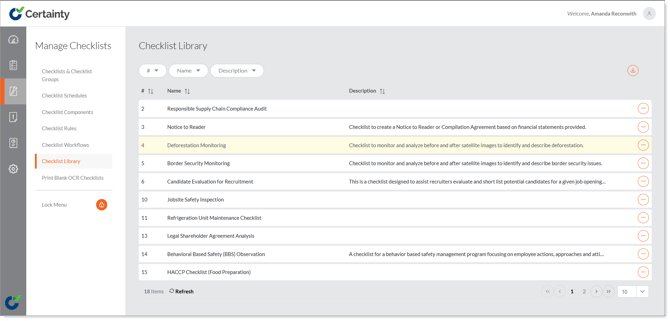
The 'Checklist Library' is a collection of template checklists provided by Certainty that can be imported and edited to suit your project.
To import a checklist from the 'Checklist Library':
1. Go to ‘Manage Checklists – Checklist Library.
2. Click on the ‘Options’ button next to the checklist you would like to import.
3. Select ‘Import’.
4. In the confirmation pop up that appears select ‘Yes’ if you are sure.
The checklist will be imported and available in ‘Checklists & Checklist Groups’ and all elements will be added to 'Checklist Components'.
### Learn this next...
[AI Vision - Overview](https://help.certaintysoftware.com/en/certaintyknowledgebase/ai-vision-overview?hsLang=en)
- [Getting Started](https://help.certaintysoftware.com/en/certaintyknowledgebase/getting-started?hsLang=en)
- [Field Users](https://help.certaintysoftware.com/en/certaintyknowledgebase/field-users?hsLang=en#main-content)
- [Getting started - Mobile App](https://help.certaintysoftware.com/en/certaintyknowledgebase/field-users?hsLang=en#getting-started-mobile-app)
- [Overview screen - Mobile App](https://help.certaintysoftware.com/en/certaintyknowledgebase/field-users?hsLang=en#overview-screen-mobile-app)
- [Checklists - Mobile App](https://help.certaintysoftware.com/en/certaintyknowledgebase/field-users?hsLang=en#checklists-mobile-app)
- [Actions - Mobile App](https://help.certaintysoftware.com/en/certaintyknowledgebase/field-users?hsLang=en#actions-mobile-app)
- [Events - Mobile App](https://help.certaintysoftware.com/en/certaintyknowledgebase/field-users?hsLang=en#events-mobile-app)
- [Reports - Mobile App](https://help.certaintysoftware.com/en/certaintyknowledgebase/field-users?hsLang=en#reports-mobile-app)
- [Account settings - Mobile App](https://help.certaintysoftware.com/en/certaintyknowledgebase/field-users?hsLang=en#account-settings-mobile-app)
- [Administrators](https://help.certaintysoftware.com/en/certaintyknowledgebase/administrators?hsLang=en#main-content)
- [Log in & Passwords - Admin Portal](https://help.certaintysoftware.com/en/certaintyknowledgebase/administrators?hsLang=en#log-in-passwords-admin-portal)
- [Dashboard - Admin Portal](https://help.certaintysoftware.com/en/certaintyknowledgebase/administrators?hsLang=en#dashboard-admin-portal)
- [Managing Completed Checklists - Admin Portal](https://help.certaintysoftware.com/en/certaintyknowledgebase/administrators?hsLang=en#managing-completed-checklists-admin-portal)
- [Managing Checklists - Admin Portal](https://help.certaintysoftware.com/en/certaintyknowledgebase/administrators?hsLang=en#managing-checklists-admin-portal)
- [Managing Actions - Admin Portal](https://help.certaintysoftware.com/en/certaintyknowledgebase/administrators?hsLang=en#managing-actions-admin-portal)
- [Reports - Admin Portal](https://help.certaintysoftware.com/en/certaintyknowledgebase/administrators?hsLang=en#reports-admin-portal)
- [Administration - Admin Portal](https://help.certaintysoftware.com/en/certaintyknowledgebase/administrators?hsLang=en#administration-admin-portal)
- [Professional Services](https://help.certaintysoftware.com/en/certaintyknowledgebase/professional-services?hsLang=en)
- [Product Updates](https://help.certaintysoftware.com/en/certaintyknowledgebase/product-updates?hsLang=en#main-content)
- [Release Notes - Admin Portal](https://help.certaintysoftware.com/en/certaintyknowledgebase/product-updates?hsLang=en#release-notes-admin-portal)
- [Release Notes - Mobile App & .mobi](https://help.certaintysoftware.com/en/certaintyknowledgebase/product-updates?hsLang=en#release-notes-mobile-app-mobi)
- [New features](https://help.certaintysoftware.com/en/certaintyknowledgebase/product-updates?hsLang=en#new-features)
- [Support](https://help.certaintysoftware.com/en/certaintyknowledgebase/support?hsLang=en)
[mailto:support@certaintysoftware.com](mailto:support@certaintysoftware.com)
Copyright © 2026, Certainty Software Inc.