---
title: Completed Checklists - Overview
description: Completed checklists are checklist forms that have been filled out and answered by Mobile App users completing audits and inspections in the field. They fill the function of ‘Audit Reports’ or ‘Inspection Reports’ in the process.
---
[Skip to content](https://help.certaintysoftware.com/en/certaintyknowledgebase/completed-checklists-overview#main-content)
English
Show submenu for translations
[](https://www.certaintysoftware.com/)
Open main navigation
Close main navigation
- English
Show submenu for translations
- [Contact Support](https://help.certaintysoftware.com/en/certaintyknowledgebase/contact-certainty-technical-support-)
[Contact Support](https://help.certaintysoftware.com/en/certaintyknowledgebase/contact-certainty-technical-support-?hsLang=en)
How can we help?
- There are no suggestions because the search field is empty.
1. [Help Center](https://help.certaintysoftware.com/en/certaintyknowledgebase?hsLang=en)
2. [Administrators](https://help.certaintysoftware.com/en/certaintyknowledgebase/administrators?hsLang=en)
3. [Managing Completed Checklists - Admin Portal](https://help.certaintysoftware.com/en/certaintyknowledgebase/administrators?hsLang=en#managing-completed-checklists-admin-portal)
# Completed Checklists - Overview
## Completed checklists are checklist forms that have been filled out and answered by Mobile App users completing audits and inspections in the field. They fill the function of ‘Audit Reports’ or ‘Inspection Reports’.
### Completed checklists
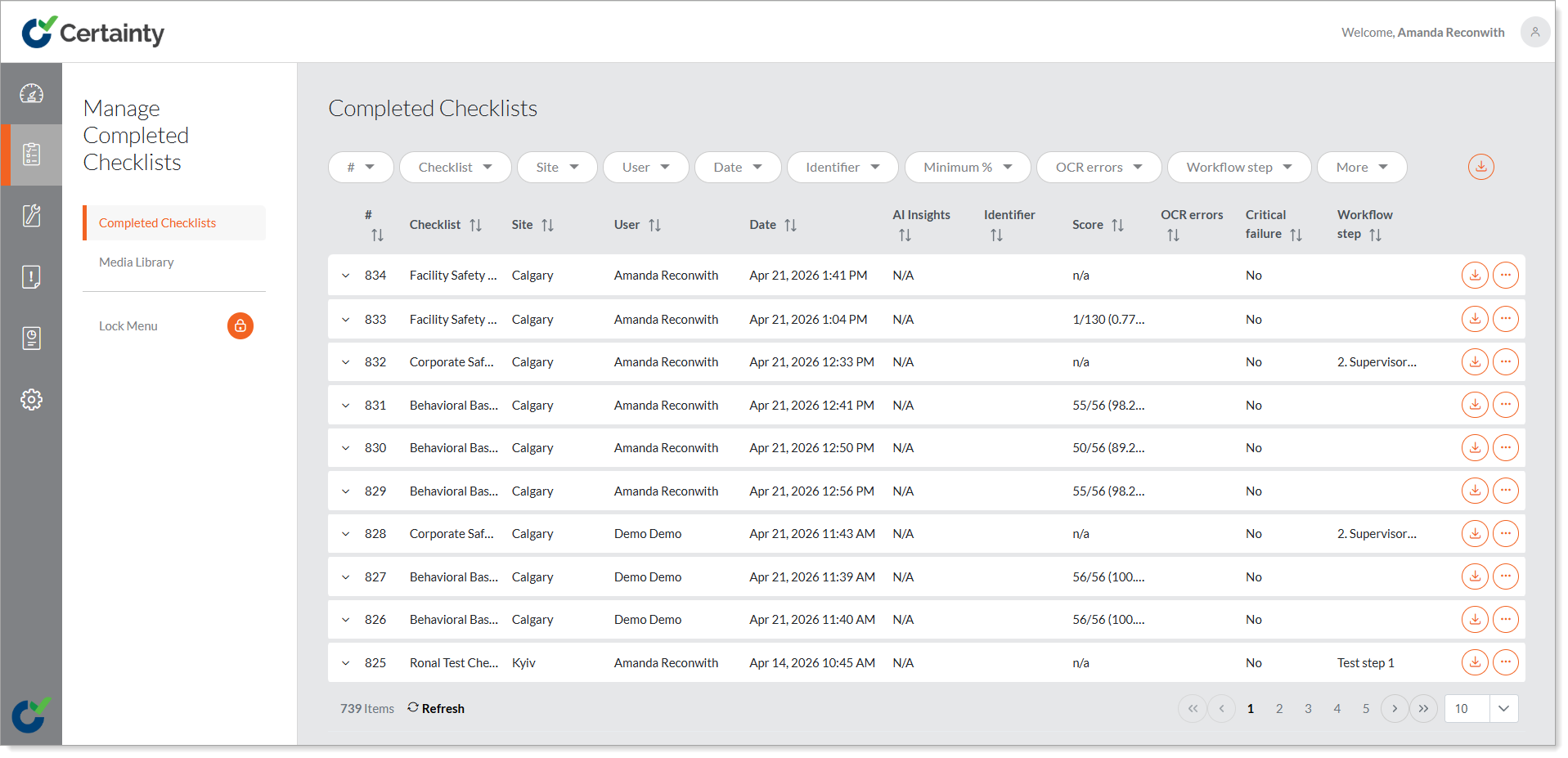
Completed checklists are checklist forms that have been filled out and answered by Mobile App users completing audits and inspections in the field. They fill the function of ‘Audit Reports’ or ‘Inspection Reports’ in the process.
A completed checklist consists of answers to audit and inspection questions, with attached files and images, comments and related actions.
Each completed checklist has a unique ID number and is based on a specific version of a checklist form called a ‘Snapshot’.
### Learn this next...
[How do I view completed checklists in the Admin Portal?](https://help.certaintysoftware.com/en/certaintyknowledgebase/viewing-completed-checklists?hsLang=en)
- [Getting Started](https://help.certaintysoftware.com/en/certaintyknowledgebase/getting-started?hsLang=en)
- [Field Users](https://help.certaintysoftware.com/en/certaintyknowledgebase/field-users?hsLang=en#main-content)
- [Getting started - Mobile App](https://help.certaintysoftware.com/en/certaintyknowledgebase/field-users?hsLang=en#getting-started-mobile-app)
- [Overview screen - Mobile App](https://help.certaintysoftware.com/en/certaintyknowledgebase/field-users?hsLang=en#overview-screen-mobile-app)
- [Checklists - Mobile App](https://help.certaintysoftware.com/en/certaintyknowledgebase/field-users?hsLang=en#checklists-mobile-app)
- [Actions - Mobile App](https://help.certaintysoftware.com/en/certaintyknowledgebase/field-users?hsLang=en#actions-mobile-app)
- [Events - Mobile App](https://help.certaintysoftware.com/en/certaintyknowledgebase/field-users?hsLang=en#events-mobile-app)
- [Reports - Mobile App](https://help.certaintysoftware.com/en/certaintyknowledgebase/field-users?hsLang=en#reports-mobile-app)
- [Account settings - Mobile App](https://help.certaintysoftware.com/en/certaintyknowledgebase/field-users?hsLang=en#account-settings-mobile-app)
- [Administrators](https://help.certaintysoftware.com/en/certaintyknowledgebase/administrators?hsLang=en#main-content)
- [Log in & Passwords - Admin Portal](https://help.certaintysoftware.com/en/certaintyknowledgebase/administrators?hsLang=en#log-in-passwords-admin-portal)
- [Dashboard - Admin Portal](https://help.certaintysoftware.com/en/certaintyknowledgebase/administrators?hsLang=en#dashboard-admin-portal)
- [Managing Completed Checklists - Admin Portal](https://help.certaintysoftware.com/en/certaintyknowledgebase/administrators?hsLang=en#managing-completed-checklists-admin-portal)
- [Managing Checklists - Admin Portal](https://help.certaintysoftware.com/en/certaintyknowledgebase/administrators?hsLang=en#managing-checklists-admin-portal)
- [Managing Actions - Admin Portal](https://help.certaintysoftware.com/en/certaintyknowledgebase/administrators?hsLang=en#managing-actions-admin-portal)
- [Reports - Admin Portal](https://help.certaintysoftware.com/en/certaintyknowledgebase/administrators?hsLang=en#reports-admin-portal)
- [Administration - Admin Portal](https://help.certaintysoftware.com/en/certaintyknowledgebase/administrators?hsLang=en#administration-admin-portal)
- [Professional Services](https://help.certaintysoftware.com/en/certaintyknowledgebase/professional-services?hsLang=en)
- [Product Updates](https://help.certaintysoftware.com/en/certaintyknowledgebase/product-updates?hsLang=en#main-content)
- [Release Notes - Admin Portal](https://help.certaintysoftware.com/en/certaintyknowledgebase/product-updates?hsLang=en#release-notes-admin-portal)
- [Release Notes - Mobile App & .mobi](https://help.certaintysoftware.com/en/certaintyknowledgebase/product-updates?hsLang=en#release-notes-mobile-app-mobi)
- [New features](https://help.certaintysoftware.com/en/certaintyknowledgebase/product-updates?hsLang=en#new-features)
- [Support](https://help.certaintysoftware.com/en/certaintyknowledgebase/support?hsLang=en)
[mailto:support@certaintysoftware.com](mailto:support@certaintysoftware.com)
Copyright © 2026, Certainty Software Inc.