---
title: How do I edit Actions in the Admin Portal?
description: You can edit actions in ‘Manage Actions – Actions’ in the Admin Portal.
---
[Skip to content](https://help.certaintysoftware.com/en/certaintyknowledgebase/editing-actions-in-the-admin-portal#main-content)
English
Show submenu for translations
[](https://www.certaintysoftware.com/)
Open main navigation
Close main navigation
- English
Show submenu for translations
- [Contact Support](https://help.certaintysoftware.com/en/certaintyknowledgebase/contact-certainty-technical-support-)
[Contact Support](https://help.certaintysoftware.com/en/certaintyknowledgebase/contact-certainty-technical-support-?hsLang=en)
How can we help?
- There are no suggestions because the search field is empty.
1. [Help Center](https://help.certaintysoftware.com/en/certaintyknowledgebase?hsLang=en)
2. [Administrators](https://help.certaintysoftware.com/en/certaintyknowledgebase/administrators?hsLang=en)
3. [Managing Actions - Admin Portal](https://help.certaintysoftware.com/en/certaintyknowledgebase/administrators?hsLang=en#managing-actions-admin-portal)
# How do I edit Actions in the Admin Portal?
## You can edit actions in ‘Manage Actions – Actions’ in the Admin Portal.
### Editing actions
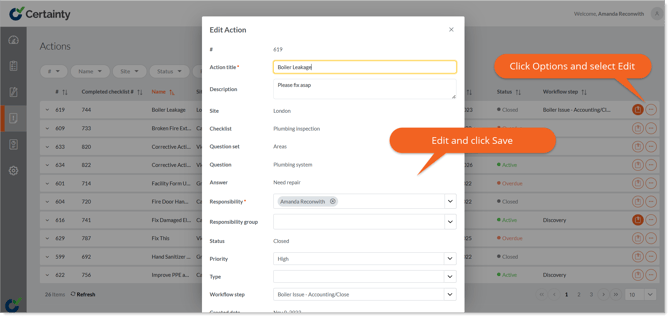
You can edit actions in ‘Manage Actions – Actions’ in the Admin Portal.
**To edit actions:**
1. Go to ‘Manage Actions – Actions’.
2. Find the action you want to edit.
3. Click the ‘Options’ button on the right side of the row to open the ‘Edit Action’ form.
4. Change the details as required.
5. Click ‘Save’
### Notes
- If an action has files or images attached, the ‘File’ icon will be highlighted when you view the action in the table. Click the highlighted ‘File’ icon to view any attached files or images.
### Learn this next...
[How do I add files and images to Actions in the Admin Portal?](https://help.certaintysoftware.com/en/certaintyknowledgebase/add-files-and-images-to-actions-in-admin-portal?hsLang=en)
- [Getting Started](https://help.certaintysoftware.com/en/certaintyknowledgebase/getting-started?hsLang=en)
- [Field Users](https://help.certaintysoftware.com/en/certaintyknowledgebase/field-users?hsLang=en#main-content)
- [Getting started - Mobile App](https://help.certaintysoftware.com/en/certaintyknowledgebase/field-users?hsLang=en#getting-started-mobile-app)
- [Overview screen - Mobile App](https://help.certaintysoftware.com/en/certaintyknowledgebase/field-users?hsLang=en#overview-screen-mobile-app)
- [Checklists - Mobile App](https://help.certaintysoftware.com/en/certaintyknowledgebase/field-users?hsLang=en#checklists-mobile-app)
- [Actions - Mobile App](https://help.certaintysoftware.com/en/certaintyknowledgebase/field-users?hsLang=en#actions-mobile-app)
- [Events - Mobile App](https://help.certaintysoftware.com/en/certaintyknowledgebase/field-users?hsLang=en#events-mobile-app)
- [Reports - Mobile App](https://help.certaintysoftware.com/en/certaintyknowledgebase/field-users?hsLang=en#reports-mobile-app)
- [Account settings - Mobile App](https://help.certaintysoftware.com/en/certaintyknowledgebase/field-users?hsLang=en#account-settings-mobile-app)
- [Administrators](https://help.certaintysoftware.com/en/certaintyknowledgebase/administrators?hsLang=en#main-content)
- [Log in & Passwords - Admin Portal](https://help.certaintysoftware.com/en/certaintyknowledgebase/administrators?hsLang=en#log-in-passwords-admin-portal)
- [Dashboard - Admin Portal](https://help.certaintysoftware.com/en/certaintyknowledgebase/administrators?hsLang=en#dashboard-admin-portal)
- [Managing Completed Checklists - Admin Portal](https://help.certaintysoftware.com/en/certaintyknowledgebase/administrators?hsLang=en#managing-completed-checklists-admin-portal)
- [Managing Checklists - Admin Portal](https://help.certaintysoftware.com/en/certaintyknowledgebase/administrators?hsLang=en#managing-checklists-admin-portal)
- [Managing Actions - Admin Portal](https://help.certaintysoftware.com/en/certaintyknowledgebase/administrators?hsLang=en#managing-actions-admin-portal)
- [Reports - Admin Portal](https://help.certaintysoftware.com/en/certaintyknowledgebase/administrators?hsLang=en#reports-admin-portal)
- [Administration - Admin Portal](https://help.certaintysoftware.com/en/certaintyknowledgebase/administrators?hsLang=en#administration-admin-portal)
- [Professional Services](https://help.certaintysoftware.com/en/certaintyknowledgebase/professional-services?hsLang=en)
- [Product Updates](https://help.certaintysoftware.com/en/certaintyknowledgebase/product-updates?hsLang=en#main-content)
- [Release Notes - Admin Portal](https://help.certaintysoftware.com/en/certaintyknowledgebase/product-updates?hsLang=en#release-notes-admin-portal)
- [Release Notes - Mobile App & .mobi](https://help.certaintysoftware.com/en/certaintyknowledgebase/product-updates?hsLang=en#release-notes-mobile-app-mobi)
- [New features](https://help.certaintysoftware.com/en/certaintyknowledgebase/product-updates?hsLang=en#new-features)
- [Support](https://help.certaintysoftware.com/en/certaintyknowledgebase/support?hsLang=en)
[mailto:support@certaintysoftware.com](mailto:support@certaintysoftware.com)
Copyright © 2026, Certainty Software Inc.