---
title: How do I add Actions in the Mobile App?
description: Action are noted during audits and inspections to address or follow-up on issues that require preventive or and corrective actions. Recording actions and findings helps ensure that anything identified during an audit or inspection is tracked and resolved.
---
[Skip to content](https://help.certaintysoftware.com/en/certaintyknowledgebase/how-do-i-add-actions-in-the-mobile-app#main-content)
English
Show submenu for translations
[](https://www.certaintysoftware.com/)
Open main navigation
Close main navigation
- English
Show submenu for translations
- [Contact Support](https://help.certaintysoftware.com/en/certaintyknowledgebase/contact-certainty-technical-support-)
[Contact Support](https://help.certaintysoftware.com/en/certaintyknowledgebase/contact-certainty-technical-support-?hsLang=en)
How can we help?
- There are no suggestions because the search field is empty.
1. [Help Center](https://help.certaintysoftware.com/en/certaintyknowledgebase?hsLang=en)
2. [Field Users](https://help.certaintysoftware.com/en/certaintyknowledgebase/field-users?hsLang=en)
3. [Actions - Mobile App](https://help.certaintysoftware.com/en/certaintyknowledgebase/field-users?hsLang=en#actions-mobile-app)
# How do I add Actions in the Mobile App?
## Actions are noted during audits and inspections to address or follow-up on issues that require prevention or correction. Recording actions and findings helps ensure that anything identified during an audit or inspection is tracked and resolved.
### Adding actions
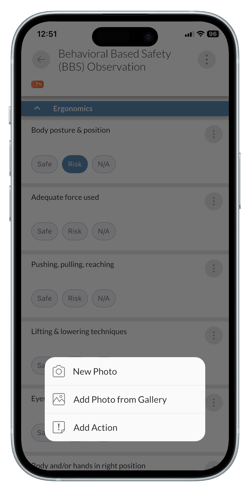
When answering a question in a checklist, tap the 'Options' menu to the right of the question title.
1. Tap 'Add Action'.
2. If more than one action workflow has been configured by your administrator you may have to select the applicable workflow.
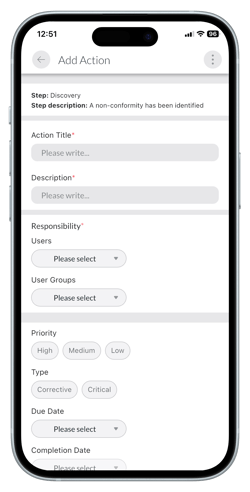
3. The 'Add Action' screen will open.
4. Fill out the details of the action.
5. Add comments as required.
6. Tap 'Save'.
### Adding comments to actions
1. In the 'Action', tap the 'Options' menu at the top right on the screen.
2. Tap 'Comments'.
3. If there are previous comments a red dot will appear next to the 'Comments' option.
4. A pop up will appear.
5. Fill out the comment.
6. Tap the paper airplane icon to save.
### Learn this next...
[How do I view and edit actions in the Mobile App?](https://help.certaintysoftware.com/en/certaintyknowledgebase/how-do-i-view-and-edit-actions-in-the-mobile-app?hsLang=en)
[How do I allow Mobile App users to add Actions during audits and inspections?](https://help.certaintysoftware.com/en/certaintyknowledgebase/allow-mobile-app-actions?hsLang=en)
- [Getting Started](https://help.certaintysoftware.com/en/certaintyknowledgebase/getting-started?hsLang=en)
- [Field Users](https://help.certaintysoftware.com/en/certaintyknowledgebase/field-users?hsLang=en#main-content)
- [Getting started - Mobile App](https://help.certaintysoftware.com/en/certaintyknowledgebase/field-users?hsLang=en#getting-started-mobile-app)
- [Overview screen - Mobile App](https://help.certaintysoftware.com/en/certaintyknowledgebase/field-users?hsLang=en#overview-screen-mobile-app)
- [Checklists - Mobile App](https://help.certaintysoftware.com/en/certaintyknowledgebase/field-users?hsLang=en#checklists-mobile-app)
- [Actions - Mobile App](https://help.certaintysoftware.com/en/certaintyknowledgebase/field-users?hsLang=en#actions-mobile-app)
- [Events - Mobile App](https://help.certaintysoftware.com/en/certaintyknowledgebase/field-users?hsLang=en#events-mobile-app)
- [Reports - Mobile App](https://help.certaintysoftware.com/en/certaintyknowledgebase/field-users?hsLang=en#reports-mobile-app)
- [Account settings - Mobile App](https://help.certaintysoftware.com/en/certaintyknowledgebase/field-users?hsLang=en#account-settings-mobile-app)
- [Administrators](https://help.certaintysoftware.com/en/certaintyknowledgebase/administrators?hsLang=en#main-content)
- [Log in & Passwords - Admin Portal](https://help.certaintysoftware.com/en/certaintyknowledgebase/administrators?hsLang=en#log-in-passwords-admin-portal)
- [Dashboard - Admin Portal](https://help.certaintysoftware.com/en/certaintyknowledgebase/administrators?hsLang=en#dashboard-admin-portal)
- [Managing Completed Checklists - Admin Portal](https://help.certaintysoftware.com/en/certaintyknowledgebase/administrators?hsLang=en#managing-completed-checklists-admin-portal)
- [Managing Checklists - Admin Portal](https://help.certaintysoftware.com/en/certaintyknowledgebase/administrators?hsLang=en#managing-checklists-admin-portal)
- [Managing Actions - Admin Portal](https://help.certaintysoftware.com/en/certaintyknowledgebase/administrators?hsLang=en#managing-actions-admin-portal)
- [Reports - Admin Portal](https://help.certaintysoftware.com/en/certaintyknowledgebase/administrators?hsLang=en#reports-admin-portal)
- [Administration - Admin Portal](https://help.certaintysoftware.com/en/certaintyknowledgebase/administrators?hsLang=en#administration-admin-portal)
- [Professional Services](https://help.certaintysoftware.com/en/certaintyknowledgebase/professional-services?hsLang=en)
- [Product Updates](https://help.certaintysoftware.com/en/certaintyknowledgebase/product-updates?hsLang=en#main-content)
- [Release Notes - Admin Portal](https://help.certaintysoftware.com/en/certaintyknowledgebase/product-updates?hsLang=en#release-notes-admin-portal)
- [Release Notes - Mobile App & .mobi](https://help.certaintysoftware.com/en/certaintyknowledgebase/product-updates?hsLang=en#release-notes-mobile-app-mobi)
- [New features](https://help.certaintysoftware.com/en/certaintyknowledgebase/product-updates?hsLang=en#new-features)
- [Support](https://help.certaintysoftware.com/en/certaintyknowledgebase/support?hsLang=en)
[mailto:support@certaintysoftware.com](mailto:support@certaintysoftware.com)
Copyright © 2026, Certainty Software Inc.