---
title: BETA - How do I approve or reject a Checklist publishing request in the Admin Portal?
description: Eligible publishers can approve (publish) or reject publishing requests in 'Manage Checklists - Checklists & Checklist Groups - Checklists'.
---
[Skip to content](https://help.certaintysoftware.com/en/certaintyknowledgebase/how-do-i-approve-or-reject-a-checklist-publishing-request-in-the-admin-portal#main-content)
English
Show submenu for translations
[](https://www.certaintysoftware.com/)
Open main navigation
Close main navigation
- English
Show submenu for translations
- [Contact Support](https://help.certaintysoftware.com/en/certaintyknowledgebase/contact-certainty-technical-support-)
[Contact Support](https://help.certaintysoftware.com/en/certaintyknowledgebase/contact-certainty-technical-support-?hsLang=en)
How can we help?
- There are no suggestions because the search field is empty.
1. [Help Center](https://help.certaintysoftware.com/en/certaintyknowledgebase?hsLang=en)
2. [Administrators](https://help.certaintysoftware.com/en/certaintyknowledgebase/administrators?hsLang=en)
3. [Managing Checklists - Admin Portal](https://help.certaintysoftware.com/en/certaintyknowledgebase/administrators?hsLang=en#managing-checklists-admin-portal)
# BETA - How do I approve or reject a Checklist publishing request in the Admin Portal?
## Eligible publishers can approve (publish) or reject publishing requests and view Publishing History in 'Manage Checklists - Checklists & Checklist Groups - Checklists'.
When a colleague who does not have publishing permission requests approval, the publishers they select receive a **Checklist Publish Request** notification. As an eligible publisher (a user with the **Checklists active – Publish** role, or an administrator, with access to all of the checklist's sites) you can either **publish** the checklist or **reject** the request and send it back to the editor.
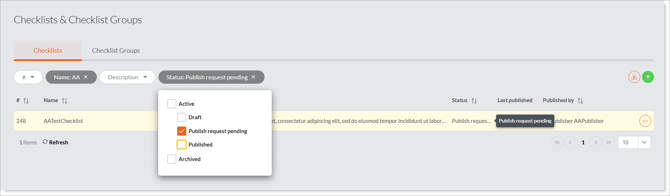
**How do I know a request is waiting?** You'll receive the *Checklist Publish Request* notification (by email if enabled), and the checklist shows the **Publish Request Pending** state in the **Checklists** grid.
### Reviewing the request
1. In the email requesting your approval, click the link to the checklist or navigate to the checklist in the Admin Portal (**Manage Checklists** › **Checklists)**. It will be marked **Publish Request Pending.**
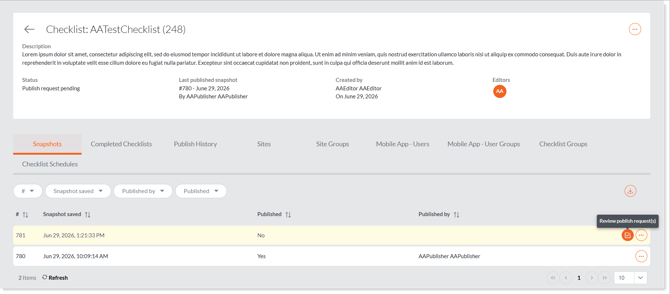
2. Review the checklist contents. Because the request is pending, the checklist is **locked** — it cannot be edited, only viewed, while you decide. Under Review Publish Requests you will see **Publish** and **Reject** options.
### Approving the request (publishing)
1. In the email requesting your approval, click the link to the checklist or navigate to the checklist in the Admin Portal (**Manage Checklists** › **Checklists)**. It will be marked **Publish Request Pending.**
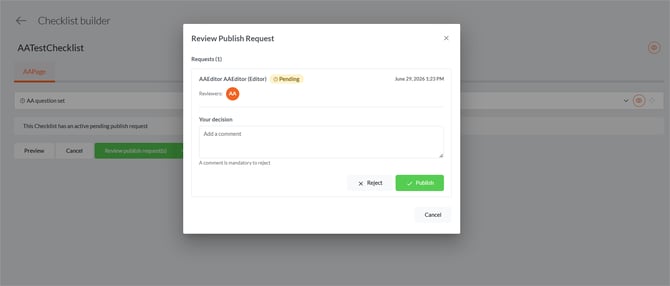
2. Open **'Review Publish Requests'** and Click **Publish**.
3. The checklist becomes **Published** to the Mobile App and is unlocked for editing. The **Checklist Published** notification is sent to the owner / editor, and the **“Published by”** and **“Published on”** details are recorded. It is now available to field users.
### **
### Rejecting the request
1. In the email requesting your approval, click the link to the checklist or navigate to the checklist in the Admin Portal (**Manage Checklists** › **Checklists)**. It will be marked **Publish Request Pending.**
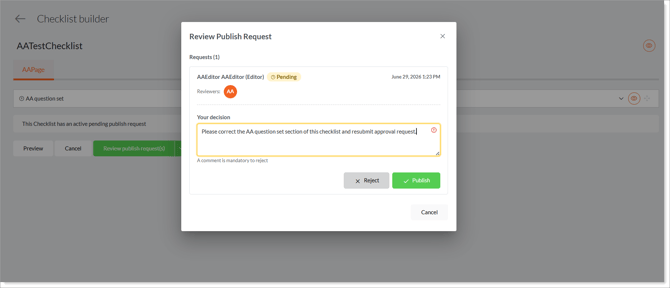
2. Open **'Review Publish Requests'** and Click **Reject**.
3. Enter a **comment** explaining why you are rejecting the request. **A comment is mandatory** — you cannot reject without one.
4. Confirm the rejection. The checklist returns to **Draft** and is unlocked so the editor can make changes. The **Checklist Publish Request Denied** notification is sent to the owner / editor, and your comment is visible to the checklist's editors and owners.
**
**Only eligible publishers and administrators** can publish, reject, or cancel a pending request. Everyone else is blocked from editing the checklist until the request is resolved.
### Reviewing publishing history
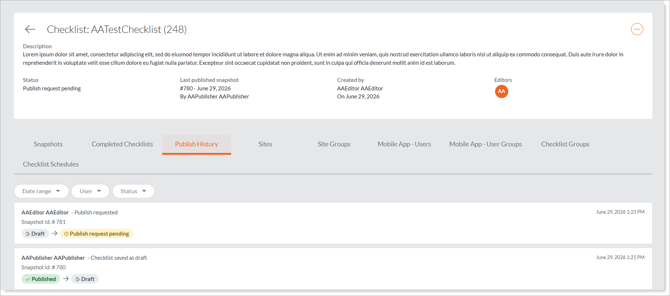
Open the checklist and go to the **Publish History** tab to see the full record: who requested publishing and when, who published or rejected it, any rejection comments, and all status changes.
**
### Learn this next…
- [Checklist Publishing & Approvals - Overview](https://help.certaintysoftware.com/en/certaintyknowledgebase/publishing-approvals-overview?hsLang=en)
- [How do I publish a Checklist or request publishing approval in the Admin Portal?](https://help.certaintysoftware.com/en/certaintyknowledgebase/checklist-publishing-approvals-overview?hsLang=en)
- [Getting Started](https://help.certaintysoftware.com/en/certaintyknowledgebase/getting-started?hsLang=en)
- [Field Users](https://help.certaintysoftware.com/en/certaintyknowledgebase/field-users?hsLang=en#main-content)
- [Getting started - Mobile App](https://help.certaintysoftware.com/en/certaintyknowledgebase/field-users?hsLang=en#getting-started-mobile-app)
- [Overview screen - Mobile App](https://help.certaintysoftware.com/en/certaintyknowledgebase/field-users?hsLang=en#overview-screen-mobile-app)
- [Checklists - Mobile App](https://help.certaintysoftware.com/en/certaintyknowledgebase/field-users?hsLang=en#checklists-mobile-app)
- [Actions - Mobile App](https://help.certaintysoftware.com/en/certaintyknowledgebase/field-users?hsLang=en#actions-mobile-app)
- [Events - Mobile App](https://help.certaintysoftware.com/en/certaintyknowledgebase/field-users?hsLang=en#events-mobile-app)
- [Reports - Mobile App](https://help.certaintysoftware.com/en/certaintyknowledgebase/field-users?hsLang=en#reports-mobile-app)
- [Account settings - Mobile App](https://help.certaintysoftware.com/en/certaintyknowledgebase/field-users?hsLang=en#account-settings-mobile-app)
- [Administrators](https://help.certaintysoftware.com/en/certaintyknowledgebase/administrators?hsLang=en#main-content)
- [Log in & Passwords - Admin Portal](https://help.certaintysoftware.com/en/certaintyknowledgebase/administrators?hsLang=en#log-in-passwords-admin-portal)
- [Dashboard - Admin Portal](https://help.certaintysoftware.com/en/certaintyknowledgebase/administrators?hsLang=en#dashboard-admin-portal)
- [Managing Completed Checklists - Admin Portal](https://help.certaintysoftware.com/en/certaintyknowledgebase/administrators?hsLang=en#managing-completed-checklists-admin-portal)
- [Managing Checklists - Admin Portal](https://help.certaintysoftware.com/en/certaintyknowledgebase/administrators?hsLang=en#managing-checklists-admin-portal)
- [Managing Actions - Admin Portal](https://help.certaintysoftware.com/en/certaintyknowledgebase/administrators?hsLang=en#managing-actions-admin-portal)
- [Reports - Admin Portal](https://help.certaintysoftware.com/en/certaintyknowledgebase/administrators?hsLang=en#reports-admin-portal)
- [Administration - Admin Portal](https://help.certaintysoftware.com/en/certaintyknowledgebase/administrators?hsLang=en#administration-admin-portal)
- [Professional Services](https://help.certaintysoftware.com/en/certaintyknowledgebase/professional-services?hsLang=en)
- [Product Updates](https://help.certaintysoftware.com/en/certaintyknowledgebase/product-updates?hsLang=en#main-content)
- [Release Notes - Admin Portal](https://help.certaintysoftware.com/en/certaintyknowledgebase/product-updates?hsLang=en#release-notes-admin-portal)
- [Release Notes - Mobile App & .mobi](https://help.certaintysoftware.com/en/certaintyknowledgebase/product-updates?hsLang=en#release-notes-mobile-app-mobi)
- [New features](https://help.certaintysoftware.com/en/certaintyknowledgebase/product-updates?hsLang=en#new-features)
- [Support](https://help.certaintysoftware.com/en/certaintyknowledgebase/support?hsLang=en)
[mailto:support@certaintysoftware.com](mailto:support@certaintysoftware.com)
Copyright © 2026, Certainty Software Inc.