
Viewing AI Insights from the admin portal
AI Insights can be viewed in 'Manage Completed Checklists - Completed Checklists'.
-
Click on the row of the Completed Checklist you want to see 'AI insights' for.
-
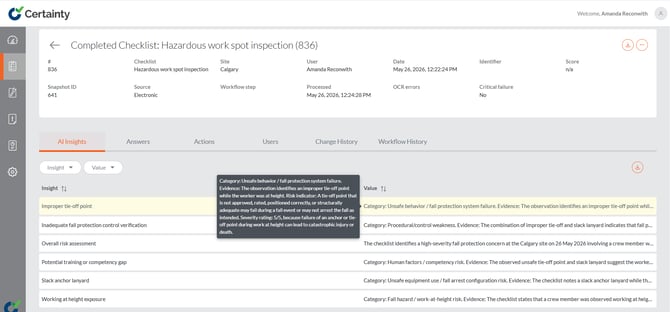
Go to the 'AI Insights' tab to see auto-generated AI Insights based on your checklist. Here AI Insights has returned several insights based on the observation of a worker at height spotted with an improper tie off and with a slack anchor lanyard.
Notes
You can specify exactly which and how many 'AI Insights' you would like to see here when you set up your AI Insight in the Add/Edit Checklist form by typing "Generate 10 AI Insights" etc in the 'Prompt' field along with any other instructions for how you'd like AI Vision to present the results.