
Admin Portal navigation
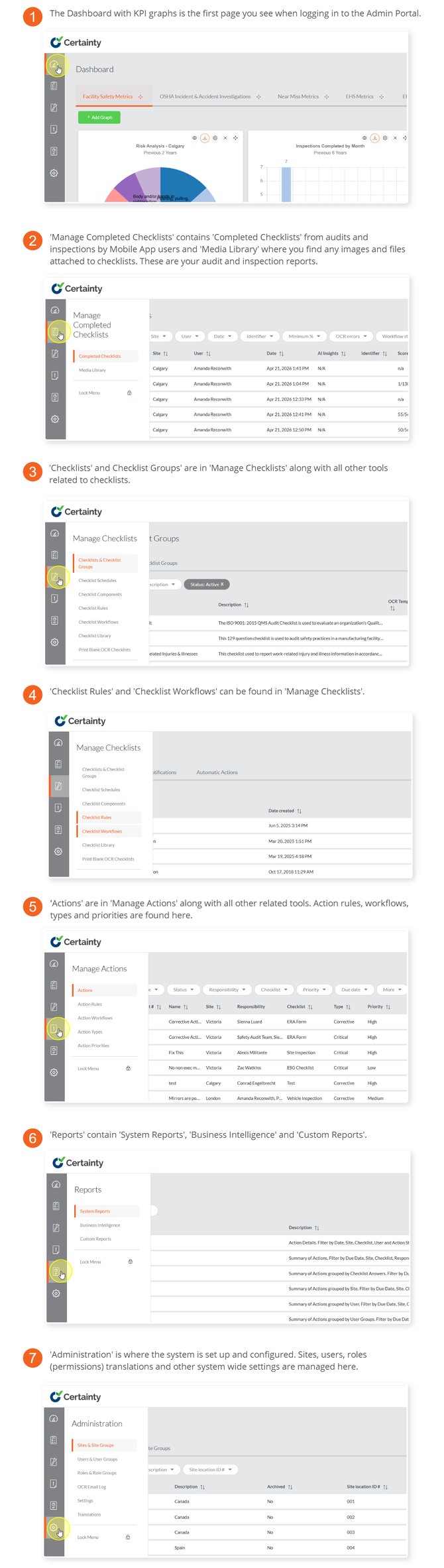
The Admin Portal is divided in the following areas, each with a number of tools:
- Dashboard – View graphs for an overview of your audit and inspection program. Tabs and graphs are individual to each user. When you first log in this page is empty until you add your own preferred information.
- Manage Completed Checklists - Access and monitor results from audits and inspections.
- Manage Checklists - Create, organize and manage checklists for field users to answer in the mobile app.
- Manage Actions - Access and monitor actions and findings.
- Reports – View standard system reports, custom reports and business intelligence.
- Administration – Manage users, sites, permissions, translations and global system settings.
Notes
- You may see all or only a few areas and tools depending on your permissions.
- You may see records associated with all sites or only records from a few sites depending on your site access.