
Viewing Checklists
Once a checklist has been added to Certainty, it can be viewed in the Admin Portal in ‘Manage Checklists – Checklists & Checklist Groups – Checklists’. You can also view snapshots, audits and inspections (completed checklists) and schedules associated with a checklist here.
To view checklists:
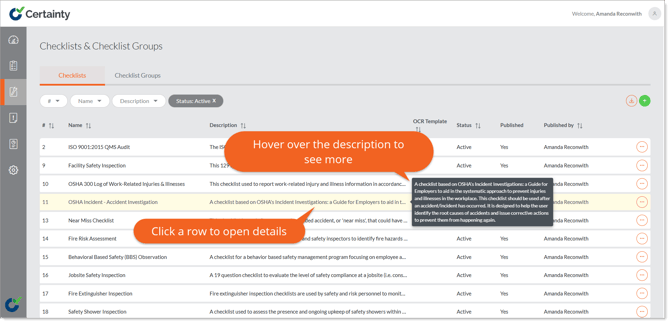
- Go to "Manage Checklists – Checklists & Checklist Groups – Checklists'.
- Checklists are displayed in rows in the checklists table.
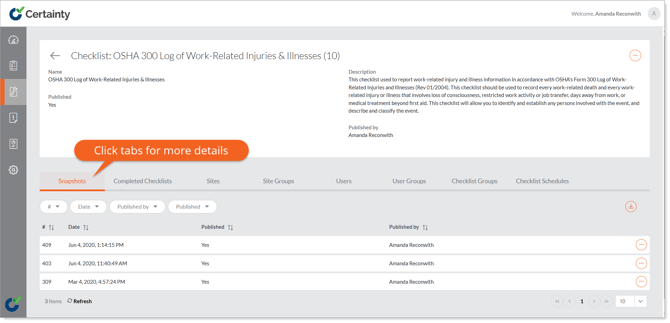
- Click anywhere in the row of the checklist you want to view, and the checklist details page will appear.
- Clicking the ‘Options’ button in the top right corner and selecting ‘Edit’ will open the ‘Checklist Builder’.
- Clicking any of the tabs below the checklist details will open tables with more details about snapshots, completed checklists, sites, site groups, users, user groups, checklist groups and change history associated with the checklist.
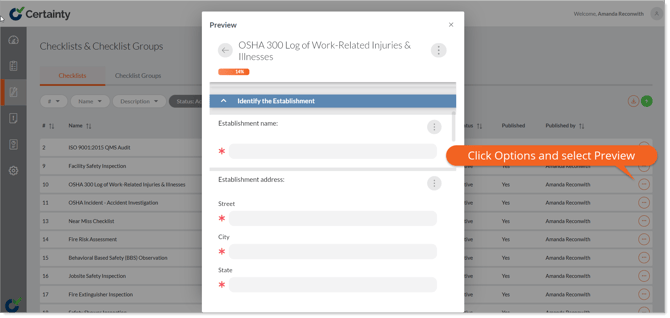
- You can also see how the checklist will appear to Mobile App users by selecting ‘Preview’ from the ‘Options’ button in the top right of the checklist details form.
Learn this next...
How do I view records associated with a Checklist in the Admin Portal?