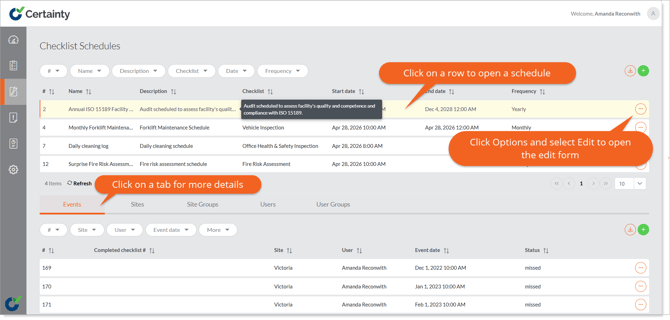
Viewing Schedules
Once a schedule has been added to Certainty, it can be viewed in the Admin Portal in ‘Manage Checklists – Checklist Schedules’ and Mobile App users who are associated with it can view the event in the app.
To view schedules in the Admin Portal:
- Go to ‘Manage Checklists – Checklist Schedules’
- Schedules are displayed in rows in the schedules table.
- Click anywhere in the row of the schedule you want to view, and a table below will appear, showing details about events, sites, site groups, users and user groups associated with the schedule. Clicking any of the tabs in the lower table will show you the records associated with the schedule and in the case of the ‘Events’ tab allows you to add ‘Events’ to that schedule.
- If instead you click the ‘Options’ button to the right of the row and select ‘Edit’ this will open the ‘Edit Schedule’ form.
- Clicking any of the tabs below the schedule details will open tables with more details about events, sites, site groups, users and user groups associated with the schedule.