
Allowing Mobile App users to add Actions 'on the fly'
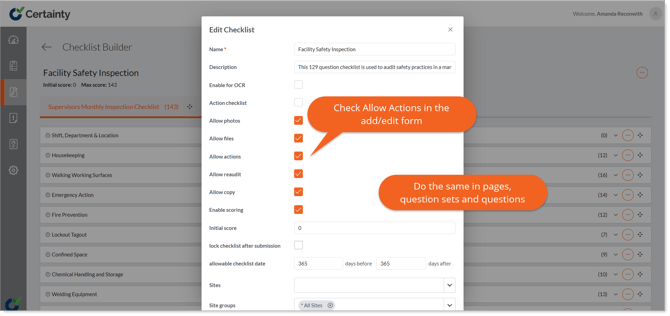
Enabling a checklist to ‘Allow Actions’ will give the Mobile App user the ability to add actions ‘on-the-fly’ as they are completing an audit or inspection. Adding actions can be enabled for a question, question set or an entire checklist. You can do this for each checklist in 'Manage Checklists - Checklists'.
If enabled by an administrator, an ‘Add Action’ option will be available to Mobile App users answering questions and a form will allow the Mobile App user to define all key attributes of the action – i.e. responsibility, due date, priority, etc.
Notes
- When adding an action, the site, checklist, question set, question and answer information is automatically defined by the checklist you are adding the action to and cannot be edited.
Learn this next...
How do I edit Actions in the Admin Portal?
How do I add Actions in the Mobile App?